
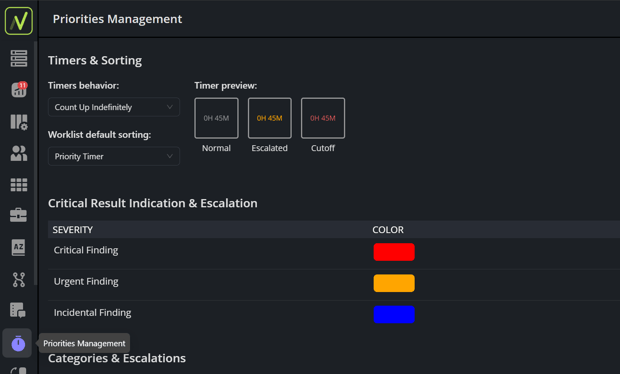
You can access the Priorities Management section in the sidebar of the NewVue application:
Timers & Sorting
The Timers & Sorting section defines the behavior of worklist timers and the default sorting method used to organize exams within each priority.
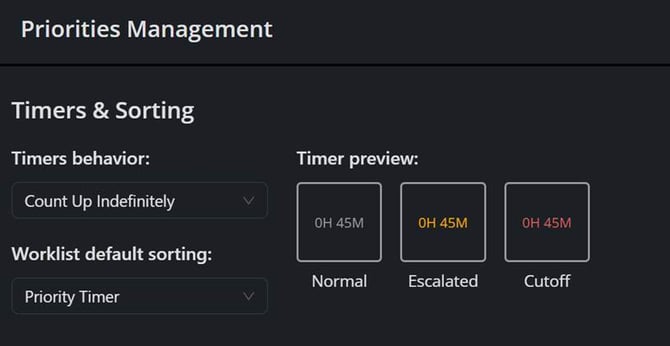
Timers behavior:
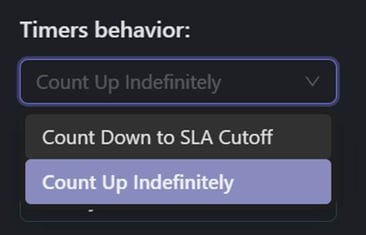
Determines how worklist timers behave.
- Count Up Indefinitely – Timer begins at zero when the exam appears on the worklist and continuously increases.
- Count Down to SLA Cutoff – Timer counts down toward the configured SLA threshold.
Worklist default sorting:
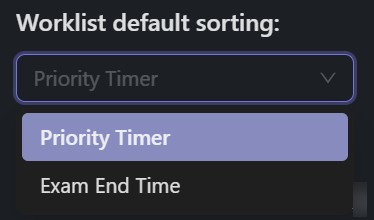
Determines how exams are ordered within the same priority.
Options include:
- Exam End Time – Oldest exam completion times appear first.
- Priority Timer – Exams visible on the worklist the longest appear first.
Critical Result Indication & Escalation
The Critical Result Indication & Escalation section is used to configure how the application handles critical result severities after an exam has been interpreted.
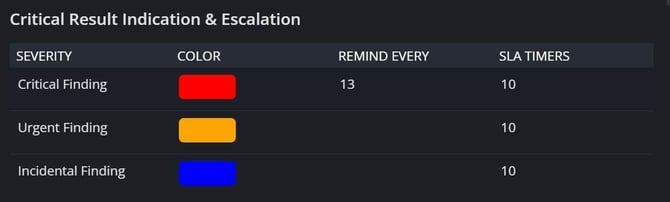
Each Critical Result can be configured with:
- Severity - Defines the available critical result categories that users can assign to an exam.
- Color - Specifies the display color associated with each severity level throughout the application.
- Remind Every - Defines the reminder interval for the selected severity.
- SLA Timers - Defines the Service Level Agreement (SLA) time associated with each severity level.
Categories & Escalations
The Categories & Escalations section defines the application's internal worklist priorities and how exams are managed throughout the workflow. Each priority can be configured with its own distribution behavior, SLA settings, escalation rules, display properties, and other workflow-specific options.

Each priority can be configured with:
- Priority Order - Determines the relative position of the priority within the worklist.
- Display Color - Specifies the display color associated with the priority.
- Display Name - Defines the name displayed for the priority throughout the application.
- Distribution Behavior - Configures how exams assigned to the priority are handled by the distribution workflow.
- Escalation Behavior - Specifies how the priority changes when configured SLA thresholds are exceeded.
- SLA Settings - Defines the Service Level Agreement (SLA) timing for the priority, including warning and escalation thresholds.
- App Lock Timeout - Configurable setting used to manage the display of lock icons (specifically the Viewer/Eye icon) on the worklist when an exam is opened.
- Appointment Proximity - Parameter to trigger the priority escalation. (NEEDS REVIEW)
Priority Statements
The Priority Statements section defines the rules used to assign exams to internal worklist priorities. Each statement evaluates one or more exam attributes and, when all configured conditions are met, assigns the exam to a priority based on the exam's incoming priority code.
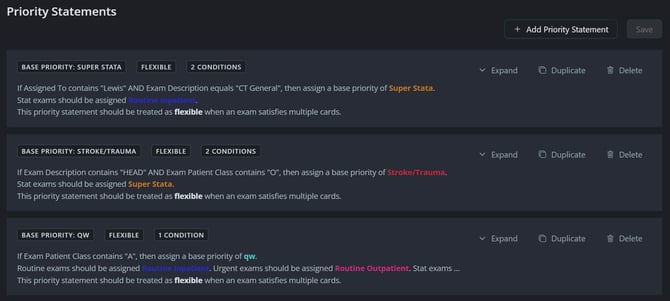
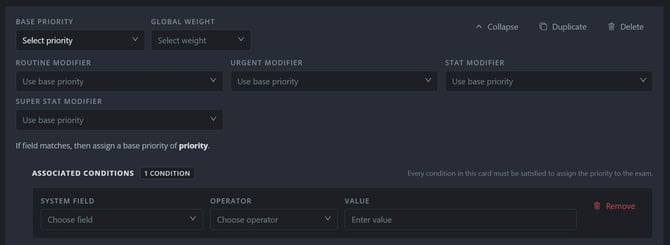
Each Priority Statement can be configured with:
- Base Priority - Defines the default worklist priority assigned when an incoming exam meets the parameters set in the Associated Conditions section.
- Global Weight - Determines how the priority statement interacts with other matching priority statements.
- Minimum - Establishes the lowest priority level an exam may be assigned. Other matching rules may increase the exam's priority but cannot assign it to a lower priority.
- Maximum - Establishes the highest priority level an exam may be assigned. Other matching rules may decrease the exam's priority but cannot assign it to a higher priority.
- Flexible - Allows the assigned priority to be adjusted by other matching priority statements, provided no Minimum or Maximum constraints are violated.
- Routine Modifier / Urgent Modifier / STAT Modifier / Super STAT Modifier - These selections will route to a priority other than the Base if the value set in the field matches the priority on the incoming HL7 message.
- Associated Conditions - Defines the conditions that must be met for the priority statement to be applied.
- System Field - Selects the exam field that will be evaluated.
- Operator - Specifies how the selected system field is compared against the configured value.
- Value - Defines the value used when evaluating the selected system field. Values are case-sensitive where applicable.